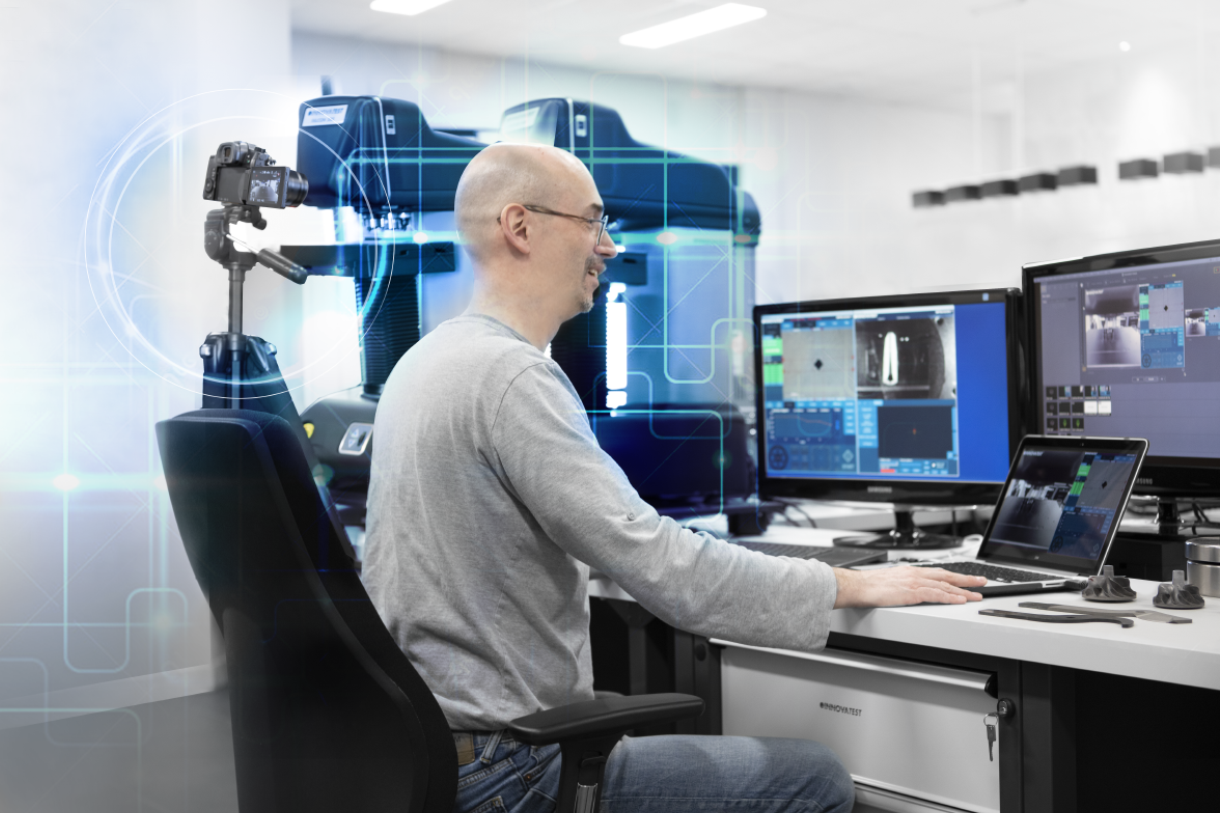










If you are in need of any immediate advice or assistance with regards to any of our products, contact the INNOVATEST support desk. In many cases, the support desk can offer immediate assistance to answer any questions you might have or solve any problem fast and effectively.
INNOVATEST products are currently distributed in over 80 countries worldwide.
The sales of all products are organized locally via INNOVATEST subsidiaries or local distributors.
Make your appointment for A PERSONAL ONLINE Innovatest product demonstration.
Welcome to contact us for an on-line demonstration of our hardness testing machines.
Send us your samples and tell us how you want them tested. Our application specialist will offer several options of tester/accessory combinations, results from testing, reports and express any cost benefits associated with each possible selection of hardness tester. We will schedule an online real-time demonstration so you can see and witness the “Most technically advanced hardness testers” in action with your samples. Results to be tested and watch online or offline how one or more of our machines can test your samples.
Have one of our application specialists provide you with a live demonstration of one or more of our hardness testing machines and their accessories.
We are supporting multiple desktop sharing system solutions for LIVE demo’s like, but not limited to: Microsoft Teams, Skype, or TeamViewer.
For more details:
Connect directly with our sales office demo@innovatest-europe.com, demo@innovatest-usa.com or connect with your local distributor for more information or to make an appointment.
Hardness testing instruments operate at peak performance when professionally installed in your workshop or laboratory. While most of the INNOVATEST machines are prepared to a degree of ‘’plug and play’’ level, they should be verified against calibration standards after each transportation. This is regardless of whether this movement is internal or external transportation.
If the testers are transported by road, rail or air from one to the another location, they need to be packed in their original (mostly) wooden crate and secured to the bottom of the crate. Air transportation can be expensive and therefore Innovatest delivers a lightweight crate that can be totally disassembled and stored for later use.
INNOVATEST has factory trained service teams located around the world to assist in the proper installation of your hardness tester. Our world wide distributors are trained to be experts in installing and providing operational training making sure your team has the most productive and knowledgeable experience with our products. Let us know how we can help you!
Our experienced service team can advise you on how to move your tester or better, take care of the detailed planning, transport preparation, reinstalling, calibration and certification of your tester. Don’t hesitate to ask for our free advice. Nearly world-wide, we are local to you!
INNOVATEST products are currently distributed in over 80 countries worldwide. The sales of all products is organized locally via INNOVATEST subsidiaries or local distributors.
A professional team of product specialists and commercial advisors offer a wide range of sales and technical training to our own staff and to distributors all over the world, to best meet the needs of our customers.
End User training is usually organized locally at end user facilities.
Please use the form below to register your INNOVATEST® product.
Keeping your hardness tester’s software updated and well-calibrated is a smart, preventive step that ensures your equipment performs at its best while reducing the risk of downtime. At INNOVATEST, we diligently pursue high quality standards and deliver regular system checks and standard maintenance on all of our hardness testers worldwide.
Hardness testing requires high levels of precision and is essential for maintaining quality and consistency in key components across industries. Having a system you can rely on for accuracy and durability allows you to make the most out of your hardness testing system.
Hardness tester software updates often include bug fixes and algorithm enhancements that improve the precision of hardness measurements and optimise testing cycles. This helps maintain the integrity of your results, especially when working with automated features like contour scanning or hardness mapping.
Like any digital system, hardness testers can be vulnerable to software-related threats. Regular updates keep your equipment protected from cybersecurity risks, unauthorised access, and data corruption. Due diligence in testing is especially important in networked lab environments.
Materials testing standards like ASTM and ISO keep evolving. Installing the latest software for hardness testers ensures your machine remains compliant with the most recent testing protocols and calibration methods, which is critical for certifications, audits, and quality assurance.
Updates often include new testing modes, data export options, or even support for modern file formats and hardware. Staying up-to-date ensures your hardness tester is compatible with the latest lab systems, databases, or new accessories.
Timely updates often fix issues before they turn into larger problems. Preventive software maintenance is recommended to reduce unexpected errors, crashes, or data loss, and keep your operation running smoothly.
At INNOVATEST, we understand the importance of accurate and reliable hardness testing reports. With a legacy that spans over a century, we have remained in step with the evolution of hardness testing, often pioneering new technology. Designed in the Netherlands, our machines are built to last.
This is why all our machines are covered by lengthy warranty systems. We also provide regular service and software updates to minimise or possibly eliminate unpleasant surprises.
During the check-up of your hardness tester, our service engineers will update the software to the latest revision of applicable standards and releases, should the need arise. You can count on the vast experience of our service team to take care of the annual calibration and verification needs of your hardness testing equipment based on your Quality system recall requirements. This includes providing INNOVATEST firmware upgrades.
Our experts are well-equipped to spot issues and troubleshoot for lasting results. They will also guide you through any new features so you can leverage them to save time and improve efficiency.
INNOVATEST offers worldwide maintenance and support services to ensure our hardness testers keep delivering the precision they were built for. All our service engineers receive regular training to stay updated on the latest compliance standards. You can rely on us to keep your machine operating optimally.
To book a maintenance or software update service at your location, contact our experts.
Yes, software updates are free for our devices as long as they are within the same version series (for example, 3.1 → 3.2). Upgrades to a new major version (e.g. 3.x → 4.0) are not included.
No, any software and firmware upgrades must be done by an INNOVATEST service engineer.
With every update of your INNOVATEST software, you will receive the latest version of the software, which could include additional functionality and enhanced software performance.
If your machine is working correctly, no software update is necessary.
Yes, all INNOVATEST software updates ensure full compliance with the latest ISO and ASTM standards.
Software updates can only be performed when the tester is not in use.
INNOVATEST software updates can be done both on-site and remotely.
On-site updates are conducted by an INNOVATEST service engineer or remotely via Teamviewer pre-installed on the machine. The machine will require an internet connection to perform a remote update.
A software update will update the software installed on the internal computer of the machine.
A firmware update will update the firmware which is installed on the controller board of the machine.
Contact your local INNOVATEST office for additional information and support.
At INNOVATEST we believe that our business is a ‘’lifestyle’’. This belief results in the world’s best in class hardness testing machines. Our 130+ employees are passionate about our lifestyle and created products and an organization offering a premium user experience and the best manufacturer’s warranty available today.
From the date you install your new hardness tester our standard warranty period is 24 months.
TIP: Select one of the 3 warranty extension packages, see the options below:



Please ask our sales department for all details.
This page contains most of the information about the INNOVATEST app. We explain the most important functionalities per screen. If you still have questions after reading this page, please fill in the contact form at the bottom of the page. We will get back to you as soon as possible!
Scan or click the QR-code below and download our INNOVATEST Hardness Converter!


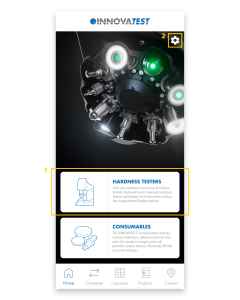
1.
This is the page you will land on after starting the app. You can use the white blocks to quickly navigate to the Products page – Hardness Testers or the Products page – Consumables.
2.
The settings-icon on the top right takes you to the Settings. Here you can change the language of the app and see which version of the app is installed.
1.
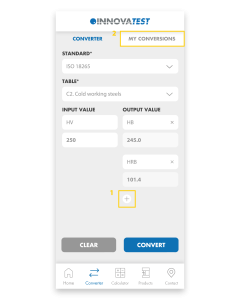
Easily convert your hardness values to other scales. First, select the Standard and then choose the Table. Select the Input and enter the value you measured. Easily add multiple Outputs and then click ‘Convert’ to convert the value.
2.
All converted values are automatically saved in My Conversions.
1.
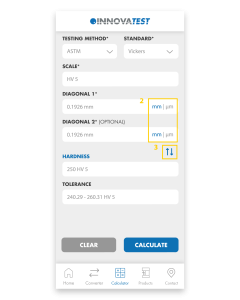
The app will calculate the Hardness, Diagonals and Tolerances for you. Choose the Test Method and Standard, select the Scale you want to use and fill in the Diagonals. Press ‘Calculate’ and the app will calculate the Hardness and Tolerance for you.
2.
You can easily switch between mm and μm by clicking on these abbreviations.
3.
By clicking on the blue arrows you can change Diagonals to Hardness. That way you can calculate the Diagonals or Diameter from the Hardness value.
1.
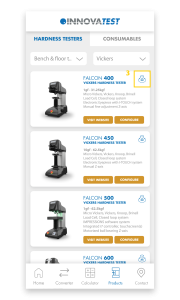
Visit our full range of products on this page. The Products page consists of Hardness Testers and Consumables. Under Hardness Testers you will find Hardness testers and Portables. Our Consumables consist of Indenters, Reference blocks and Sets.
2.
Each product block consists of a number of buttons; ‘Visit website’, ‘Configure’ and a 360° icon. ‘Visit website’ sends you to the website where all details about the tester are gathered. ‘Configure’ redirects you to the Configurator on our website where you can configure the machine to your liking. Once you have assembled your machine, you can easily request a quote and return to the app.
3.
The 360° icon allows you to view our testers in Augmented Reality. Using the camera of your phone, you can place our models anywhere in the real world and view them from all angles. The scale of our testers is pretty accurate so you immediately get an impression of the size of our machines. By switching to the ‘Object’ tab you can isolate the machine and scale and rotate it as you wish. If you are unable to load a tester, it usually helps to point the camera at a flat surface before clicking the 360 icon. If you move the camera slowly around, it will recognize the surface more easily and automatically load the tester.
4.
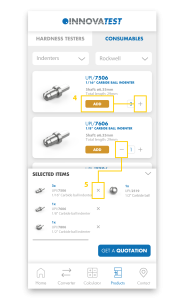
Here you can see all our consumables and add them to your shopping basket by pressing ‘+’ or ‘add’. Under ‘Selected items’ you will find all added products and you can request a quotation with one click on the button. You will automatically receive a confirmation e-mail with all selected items.
5.
To remove products from the basket, press ‘-‘ or the ‘X’ in the basket.
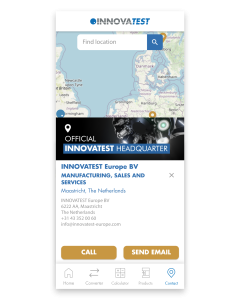
1.
On the Contact Us page you will find all our branches and distributors. Clicking on any of our establishments will automatically display all contact information. Please feel free to contact us if you have any questions. If you have other questions regarding our app, please fill in the contact form below and we will get back to you as soon as possible.